Little Fairy in the Woods 3D Paper Cut
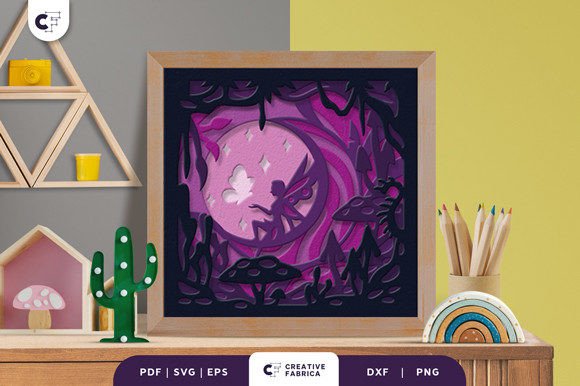
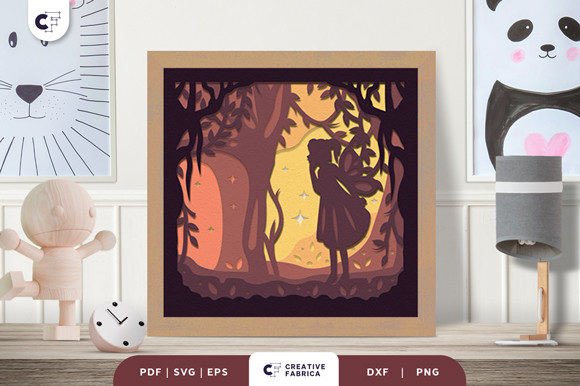
If you're looking for a unique and enchanting way to decorate your space, the Little Fairy in the Woods 3D Paper Cut is a perfect choice. This stunning piece of art features a cute fairy exploring a magical forest filled with towering trees and glowing stars. Its intricate design and layered structure bring a touch of whimsy and charm to any room, making it ideal for home decor, gifts, or creative projects.
The Little Fairy in the Woods 3D Paper Cut is designed to be used with a cutting machine like Cricut or Silhouette, allowing you to create a beautiful shadow box that can double as a night light. With the addition of an LED light strip, this paper cut transforms into a soft, ambient glow that adds warmth and magic to a child's bedroom or a cozy living area.
What You Need to Create Your Own
To bring this design to life, you'll need a few key items. First, a cutting machine such as a Cricut or Silhouette will help you precisely cut the layers from your chosen material. Next, 3D adhesive like foam double-sided tape is essential for creating the depth and dimension of the 3D effect. Optionally, you can add a decorative frame and LED lights for a more polished look.
It’s important to note that the final product color may vary slightly due to lighting conditions and the paper color used. The design is created using Encore Cardstock 80 lb cover (216 gsm), which offers a premium feel and durability. If you're looking for high-quality cardstock, consider visiting the 12×12 Cardstock Shop, where you can find the materials needed for your project.
Common Mistakes and How to Avoid Them
While the Little Fairy in the Woods 3D Paper Cut is a fantastic project, there are several common mistakes that users might encounter. One of the most frequent issues is not properly preparing the materials before cutting. Using low-quality paper or not securing it correctly on the cutting mat can lead to misaligned cuts or damaged layers, which can ruin the overall appearance of the finished piece.
Another mistake is skipping the step of testing the design on a smaller scale before committing to the full project. This can save time and materials, especially if you’re new to 3D paper cutting. It’s also crucial to ensure that the layers are assembled in the correct order, as mixing up the sequence can result in a less realistic or unbalanced look.
Some users may also overlook the importance of proper lighting. While the LED strip enhances the visual appeal, placing it incorrectly can cause shadows or uneven illumination. Experimenting with the placement of the light source can make a significant difference in how the final piece looks when displayed.
Choosing the Right Format for Your Project
The Little Fairy in the Woods 3D Paper Cut is available in multiple formats, including SVG, PDF, EPS, PNG, and DXF. Each format has its own advantages, so it’s important to choose the one that best suits your cutting machine and software. For example, SVG files are ideal for use with Cricut Design Space, while EPS and DXF may be more compatible with Silhouette Studio or other advanced design programs.
Before downloading or purchasing the design, check the compatibility of the file type with your specific cutting machine. Some machines may have limitations on the types of files they can process, and using an incompatible format can lead to frustration and wasted time.
Understanding the Layers and Size
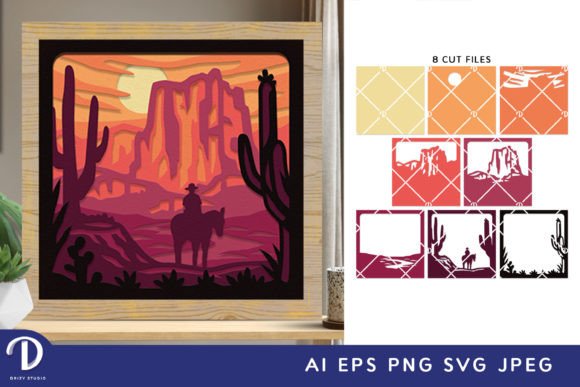
This design consists of eight layers, each contributing to the 3D effect. Properly separating and assembling these layers is essential for achieving the desired depth and visual impact. If the layers are not stacked correctly, the overall design may appear flat or distorted.
The size of the paper cut is 20.32×20.32 cm, which is suitable for most standard shadow boxes. However, if you plan to use it in a different frame or display case, make sure the dimensions fit your intended space. Measuring twice and cutting once can prevent costly mistakes and ensure a perfect fit.
Getting the Most Out of Your Purchase
When purchasing the Little Fairy in the Woods 3D Paper Cut, take the time to review the product description carefully. Pay attention to details such as the number of layers, file formats, and recommended materials. This information can help you avoid confusion and ensure that you receive exactly what you need for your project.
Additionally, consider the purpose of the final piece. Are you creating it for personal use, as a gift, or for a business? Understanding your end goal can guide your choices regarding materials, colors, and presentation. For instance, if you're making it as a gift, you might want to include additional elements like a custom frame or a handwritten note to add a personal touch.
Final Tips for a Successful Project
Creating the Little Fairy in the Woods 3D Paper Cut is a rewarding experience that combines creativity, precision, and craftsmanship. By avoiding common mistakes, selecting the right materials, and following best practices, you can achieve a beautiful and professional-looking result.
Remember to take your time, especially if you're new to 3D paper cutting. Practice makes perfect, and even small adjustments can significantly improve the final outcome. Whether you're a hobbyist, a creator, or a business owner, this design offers endless possibilities for expression and decoration.
Explore the world of 3D paper art today and discover the magic of the Little Fairy in the Woods 3D Paper Cut. With the right approach and attention to detail, you can turn this elegant design into a cherished piece of art that brings joy and wonder to your space.